
What Is a Court Docket in Bay County
A docket is the running schedule of a court case. It lists each hearing, the date and time it is set, the judge or jurist assigned, and the type of event on the calendar. In Bay County, docket entries cover everything from a first appearance to a sentencing date. The record grows as a case moves along. Each new hearing adds a line, so the docket becomes a timeline of the case from start to finish.
A docket is not the full case file. It tells you what happened and when, but it does not hold the motions, orders, exhibits, or written rulings themselves. Think of the docket as the table of contents. The full file holds the actual documents. For a hearing date or a status update, the docket is enough. For copies of filed papers, you need the case file at the courthouse.
Bay County spreads docket activity across more than one trial court. A traffic or misdemeanor hearing sits on the district court calendar. A felony or divorce hearing shows on the circuit court calendar. Probate and Friend of the Court matters keep their own calendars too. One public portal pulls all of these together, so a single search can surface hearings from any of the county's court venues.
How to Search Bay County Court Dockets
Bay County posts its calendars through the court portal at courtpmt.baycounty.net. The calendar page lives at c74_calendar.php and sits beside the public case-search tool. Both are free, and neither requires a login for a basic lookup. The calendar view is built for docket work because it lets you filter by date range, by judge, and by court.
The Bay County court calendar search form opens with a set of name, date, and court fields you can mix and match.
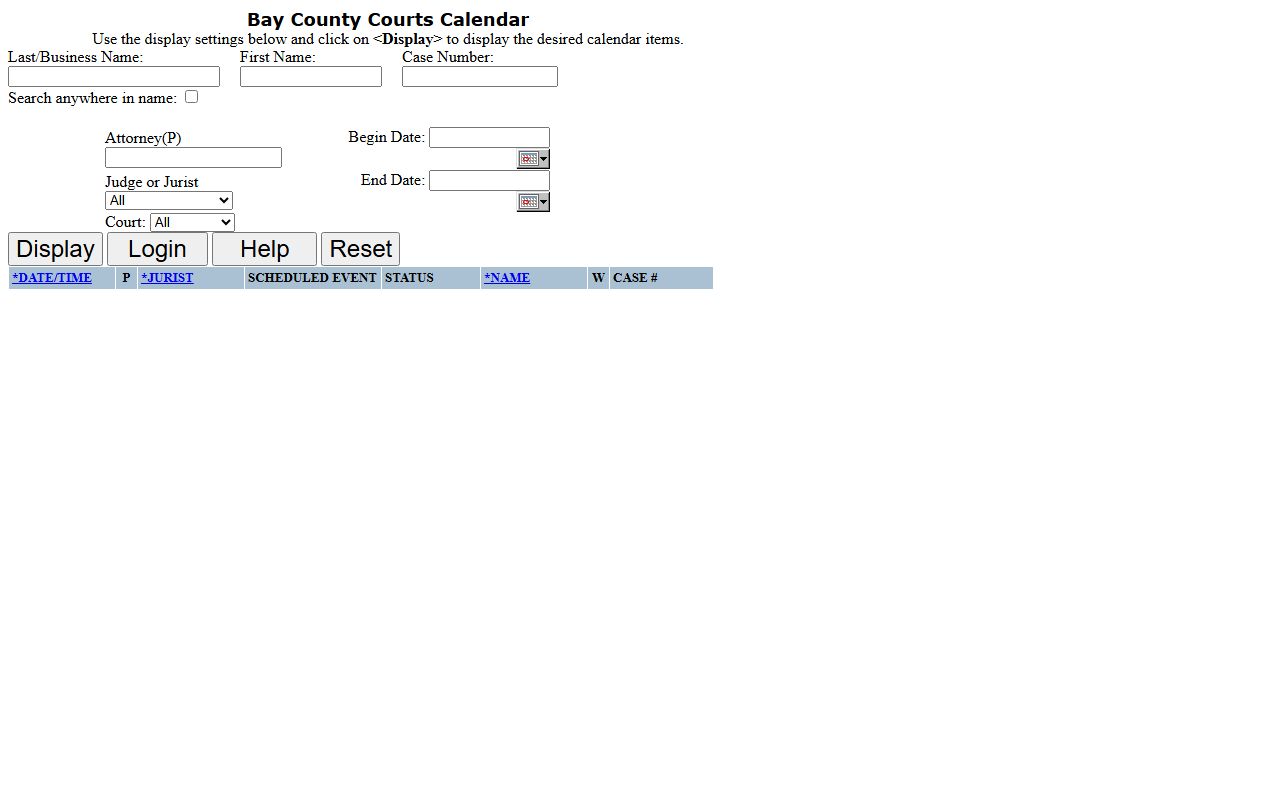
Once the form returns results, each row is a scheduled hearing you can scan for the date, the event type, and the assigned jurist. The layout keeps docket data compact so a full day of court fits on one screen.
The case-number field matters most for people who already hold a docket number. That number often appears on a citation, a hearing notice, or a prior court paper. Drop it into the Case Number box and the calendar jumps straight to the matching hearings. The judge filter is just as handy for docket work, since it lets you narrow the calendar to one jurist instead of scrolling a full day of court.
A basic Bay County docket search takes only a few steps.
- Open the portal at courtpmt.baycounty.net and choose the c74 calendar search page.
- Pick the court from the Court dropdown, such as District, Circuit, Probate, or FOC.
- Enter a last or business name, a first name, or a case number to narrow the list.
- Set a Begin Date and End Date to limit the calendar to the window you care about.
- Click Display to load the docket, then read each row for the event, status, and hearing time.
Calendar Search Fields in Bay County
The calendar form offers more filters than the case-search page. It keeps the same name and case-number fields, then adds an attorney filter and a date range. That mix lets a lawyer, a party, or a reporter pull a full day's docket for one judge or one court. The field labels below use the county's own wording, kept as they appear on the portal.
| Field | Type | Notes |
|---|---|---|
| Last/Business Name | Text | Person surname or a business party name |
| First Name | Text | Given name of the party |
| Case Number | Text | Direct lookup when you have the docket number |
| Search anywhere in name | Checkbox | Matches text anywhere in the name, useful for aliases |
| Attorney(P) | Text | Filter by the attorney tied to the case |
| Begin Date | Date | Start of the calendar window |
| End Date | Date | End of the calendar window |
| Judge or Jurist | Dropdown | Narrow to one assigned judge or jurist |
| Court | Dropdown | District, Circuit, Probate, or FOC |
The form also carries Display, Login, Help, and Reset buttons. Display runs the search, and Reset clears the fields. The login link points to features that are not part of the free public view.
Reading a Bay County Docket Entry
Each calendar result is one row with eight columns. Read it left to right and the row tells you when the hearing sits, who hears it, what kind of event it is, and how it stands. The Name column ties the row to a party, and the Case # column links it back to the underlying file.
| Column | What It Shows |
|---|---|
| Date/Time | When the hearing is scheduled on the court calendar |
| P | A single-letter flag the portal does not define in the public view |
| Jurist | The judge or jurist assigned to hear the matter |
| Scheduled Event | The type of hearing, such as pre-trial or sentencing |
| Status | How the matter stands, such as Responsible or Dismissed |
| Name | The party tied to the calendar entry |
| W | A single-letter flag shown without a stated meaning in the public view |
| Case # | The case number that links the row to the full record |
Two of the columns use single letters. The portal labels one column P and another column W but does not spell out either meaning in the public view. The W flag lines up with warrant-related follow-up that the county handles through other offices, though the site never defines the letter. Keep the label in mind without reading extra meaning into it.
Courts That Publish Bay County Calendars
The calendar dropdown covers each trial court in the county's system. Michigan runs a three-tier trial structure of circuit, district, and probate courts, and Bay County follows it directly. Friend of the Court rounds out the list with family-support matters that carry their own hearing schedule.
The state's Michigan trial courts overview explains how these venues divide the work.
That split is why one Bay County docket search can return a felony hearing and a small-claims date on the same screen. Each court routes its calendar into the shared portal.
- 18th Circuit Court for felonies, major civil cases, domestic relations, and appeals from lower courts.
- 74th District Court for misdemeanors, minor traffic, small claims, and landlord-tenant hearings.
- Probate and Family Court for estates, guardianships, adoptions, and juvenile matters.
- Friend of the Court for support, custody, parenting-time, and enforcement hearings.
Felony matters often start on the district calendar as a preliminary exam, then move to circuit court. Those later hearing dates, along with the charges and sentence, sit in the county's criminal court records.
Common Docket Event Labels
The Scheduled Event column names the reason for a hearing rather than a generic slot. That detail lets you tell a pretrial date from a sentencing or a probation review. The labels below show up across the district and circuit calendars.
- Advice of Rights Hearing
- Fine Review
- Order to Show Cause
- Pre-Trial Conference
- Probation Violation
- Sentencing
- Review
Other labels round out the list, such as To Accept or Reject, Accept/Reject Offer, Restitution Hearing, and Discovery Hearing. The Status column then shows how a matter stands, with values like Responsible, Non Appear, and Dismissed. Together the event and status columns give a quick read on where a case sits without opening the full file.
Note: A blank or truncated status simply means the entry has no recorded result yet, not that the hearing was skipped.
Dockets Versus Full Case Records in Bay County
The docket and the case file serve different jobs. A docket is a quick, event-by-event list you can pull online in seconds. The full case record holds the documents behind those events, and getting it may mean a trip to the courthouse or a formal request to court staff.
| Docket | Full Case Record | |
|---|---|---|
| Format | List of entries | Full documents |
| Access | Online and free | Request or courthouse visit |
| Content | Dates, events, status | Motions, orders, exhibits |
| Best for | Tracking hearings | Legal review and evidence |
For deeper detail, the docket points the way and the file fills it in. Financial fields, charge tables, and judgments live in the case detail rather than the calendar row. A broader look at how to pull those files sits with Bay County court records and their request process. Court files stay open to the public unless a statute, court rule, or an order under MCR 8.119 restricts them.